
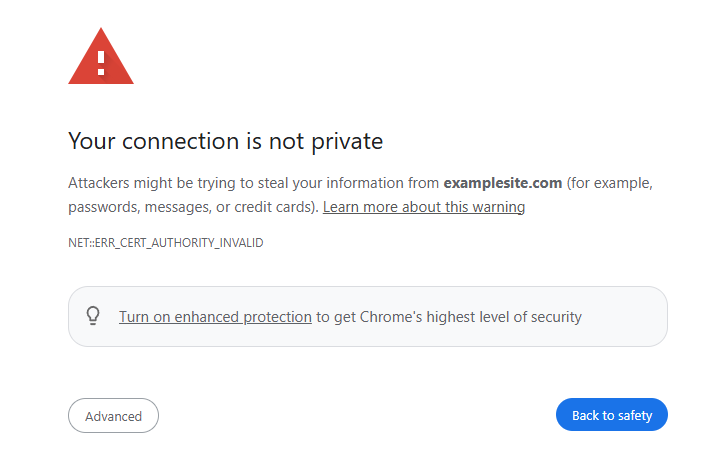
If you’re seeing a message like the one below, this means the website you’re visiting does not have an SSL certificate installed, which is common for in-progress development sites. Some browsers (especially in Incognito or Private mode) block access to these sites by default.
Here’s how to get around this:
✅How to Proceed
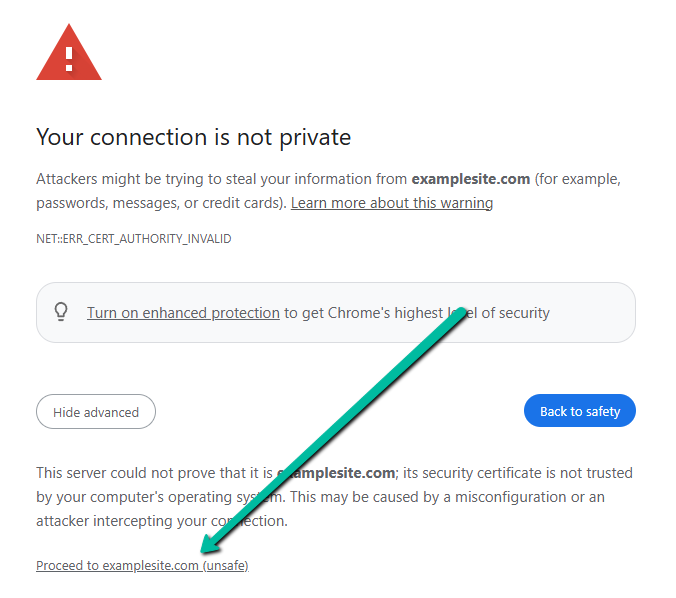
Click the “Advanced” button.
Then click “Proceed to examplesite.com (unsafe)”.
The site will now load.
🔐 Why This Happens
Development sites often run on temporary or internal domains (like dev.examplesite.com, staging.clientsite.co.nz, or IP addresses) and may not have HTTPS enabled. Modern browsers are designed to protect users from insecure websites, so they block access unless you bypass the warning manually.
🛠 What to Do if It Still Doesn’t Work
- Clear your browser cache and try again.
- Try loading the site in a different browser.
- Contact our team if the issue persists — we’re here to help!
